Tools
OCL Mapper
AI-enabled terminology mapping designed for collaboration with the global community
All you need to start: a spreadsheet (.csv or .xlsx) of your local terms, one per row.
Streamlined mapping workflow
Quickly move from loading your content to generating mapping candidates and saving your final mapping decisions in your chosen format
AI-enabled matching algorithms
Leverage powerful AI methods to reduce the time and cost of your mapping projects
Community content
Benefit from community mappings to follow best practices and to learn from others
The CIEL bridge
Map your terms through CIEL to the terminology you need
The CIEL bridge maps by way of CIEL. The Mapper matches each of your local terms to a CIEL concept, then follows CIEL's curated maps from that concept to your target terminology. That includes ICD-10, ICD-11, SNOMED CT, LOINC and RxNorm, and standard OMOP concepts through Athena.
1
Your local term
A row from your spreadsheet
2
A CIEL concept
The Mapper matches your term to CIEL
3
Your target code
Reached through CIEL's curated maps
In the Mapper, the bridge is the OCL CIEL Bridge Terminology, listed as Bridge terminology search when you choose matching algorithms.
In a 100-term ICD-11 evaluation, the CIEL bridge was the strongest single source of correct codes and found 14 that no other algorithm did. Adding the bridge raised exact ICD-11 matches from 42 to 60 of 100.
Bridge terminology search is marked Premium in the Mapper: it's included in the Pro, Team and Enterprise plans. See pricing
What is CIEL?
CIEL is a curated interface terminology from Columbia University, distributed through OCL. Many OpenMRS implementations around the world build their concept dictionaries on it.
Explore CIEL on OCL Online →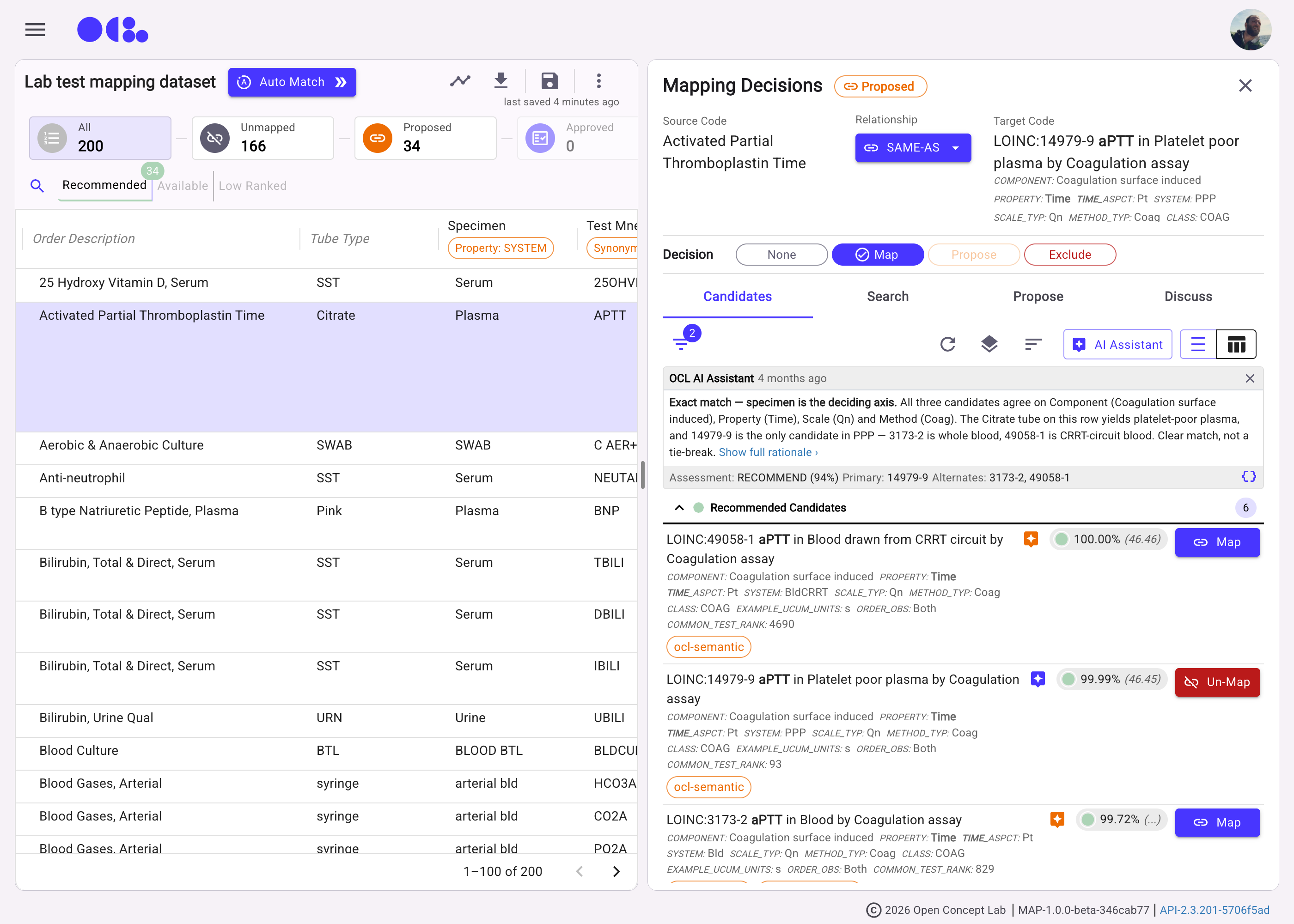
See it in action
AutoMatch your rows, then decide with the evidence in front of you
AutoMatch every row at once
Run OCL's matching algorithms across your whole spreadsheet and get ranked candidates for each row.
The OCL AI Assistant's recommendation, with its reasoning
Not just a score — the OCL AI Assistant says which axis decided the match, and why the alternates lost.
Decide, review, export
Map, propose or exclude each row, then export your decisions in the format you need.
Get started with the OCL Mapper
Use the OCL Mapper alongside the global community or install it on your own infrastructure.